
Automated Bank Statement Processing for Accounting Firms
Stop spending hours on manual data entry. CapyParse extracts transactions from PDF bank statements and converts them to CSV, Excel, or QBO files ready for QuickBooks, Xero, and other accounting software.
10 pages free • No credit card required • Setup in 5 minutes
Why Accounting Firms Need Automated Bank Statement Processing
Every accounting firm deals with the same bottleneck: clients send PDF bank statements, and someone has to manually key every transaction into QuickBooks, Xero, or a spreadsheet. A single 12-month engagement can mean hundreds of pages of statements, each requiring careful extraction of dates, payees, amounts, and check numbers.
Manual data entry is slow, expensive, and error-prone. A mistyped amount or transposed date can cascade through reconciliation, trial balance, and financial reporting. For firms handling multiple clients across multiple banks, the problem compounds. Chase statements look different from Bank of America statements, which look different from Wells Fargo statements. Each bank uses its own PDF format, column layout, and date conventions.
CapyParse solves this by using AI to read bank statement PDFs from any bank and extract every transaction into structured data. The output is a clean CSV, Excel, or QBO file that imports directly into your accounting software -- no reformatting, no copy-paste, no manual entry.
See How CapyParse Transforms Bank Statement Processing
Extract transactions and checks per account with high accuracy and visual verification
Transaction Extraction
Automatically extract every transaction with perfect accuracy to CSV/Excel/Google Sheets
Transaction Export
Check Extraction
Extract check details including amounts and payee information
Check Processing
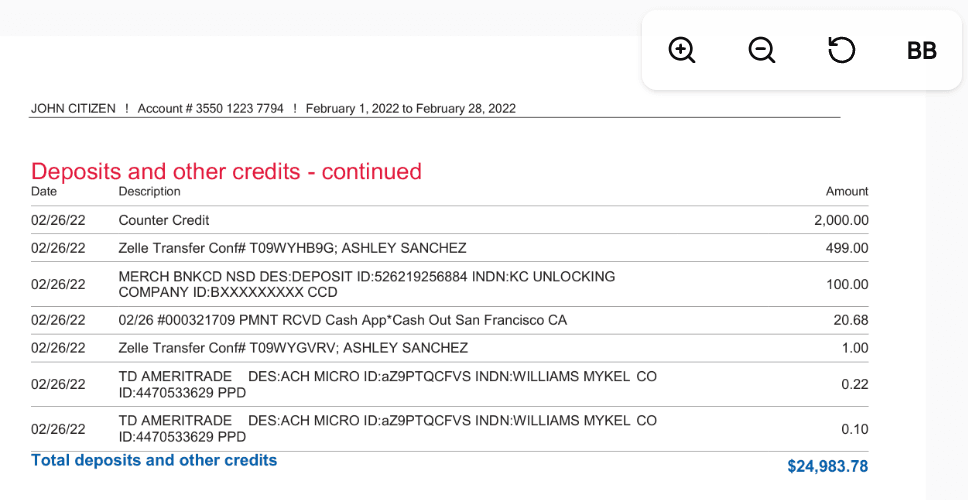
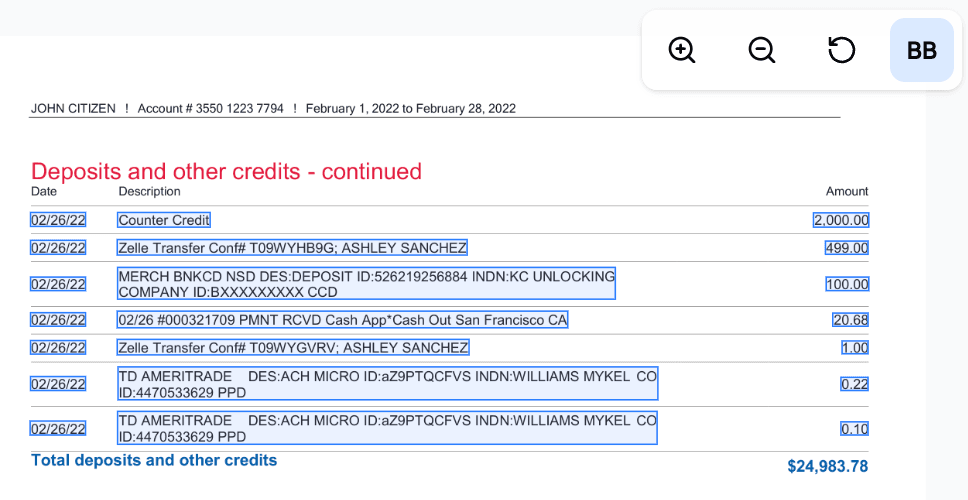
Visual Verification
Review extracted data with side-by-side comparison
Visual Verification
How Accounting Firms Use CapyParse
Upload Client Bank Statements
Upload PDF bank statements from any bank -- Chase, Bank of America, Wells Fargo, Citi, Capital One, or any other institution. CapyParse handles checking accounts, savings accounts, credit card statements, and business accounts. Upload one statement, batch-upload an entire year, or drop in a single PDF that holds several months: each statement is verified on its own.
AI Extracts Every Transaction
Our AI reads each page, identifies the transaction table, and extracts dates, descriptions, amounts, check numbers, and running balances. It handles multi-page statements, split transactions, and even scanned or photographed documents using OCR. You can visually verify every extracted field against the original PDF.
Clean Up and Categorize
Use the built-in Export Editor to clean cryptic bank descriptions into readable payee names, auto-assign QuickBooks categories, fix date issues, and make any manual corrections -- all before exporting. Changes save as a draft so you can come back later.
Export to CSV, Excel, or QBO
Download the cleaned data as CSV for Excel and Google Sheets, as an Excel .xlsx file, or as a QBO file for direct import into QuickBooks, Xero, FreshBooks, or Wave. The exported file includes all your edits and categorizations. Import it into your accounting software and move on to advisory work.
Built for Accounting Workflows
Every feature designed to streamline your practice operations
Export Ready Data
Get perfectly formatted data ready for Excel, QuickBooks, or any accounting software. No reformatting needed.
Custom Data Fields
Configure extraction fields to match your specific workflow. Capture exactly what you need for each client.
Multi-Client Management
Organize and track documents across all your clients in one secure dashboard with role-based access.
Bank-Grade Security
Military grade encryption with end-to-end protection and audit trails. Your client data is always protected.
Priority Support
Get dedicated support from our staff. Phone, email, and chat support when you need it.
Scale Your Practice
Handle 10x more clients without hiring additional staff. Grow revenue while reducing operational overhead.
Works With Every Bank
CapyParse processes bank statement PDFs from all major U.S. banks and credit unions, including Chase, Bank of America, Wells Fargo, Citi, Capital One, US Bank, PNC, TD Bank, Truist, Ally, Discover, USAA, Navy Federal, Regions, KeyBank, Fifth Third, Huntington, Citizens, Schwab, Chime, American Express, and hundreds more. If it is a PDF, we can extract it.
Ready to Automate Bank Statement Processing?
Join accounting firms already saving hours per client with CapyParse. Start with 10 pages free -- no credit card required.
Questions? Open a chat with the chat widget or email hello@capyparse.com
Working with a specific bank? See our converters for Chase, Bank of America, Wells Fargo, and more.