For bookkeepers & small businesses
PDF Bank Statement Converter
Drop a PDF below and get every transaction, ready for QuickBooks, Xero or Excel. No signup needed.

Click to upload or drag & drop
your bank statement PDF
Select PDF filePDF only · up to 6 pages · 10 MB max
Need more than the demo? Start free with 10 pages
Catch up a year of books in an afternoon
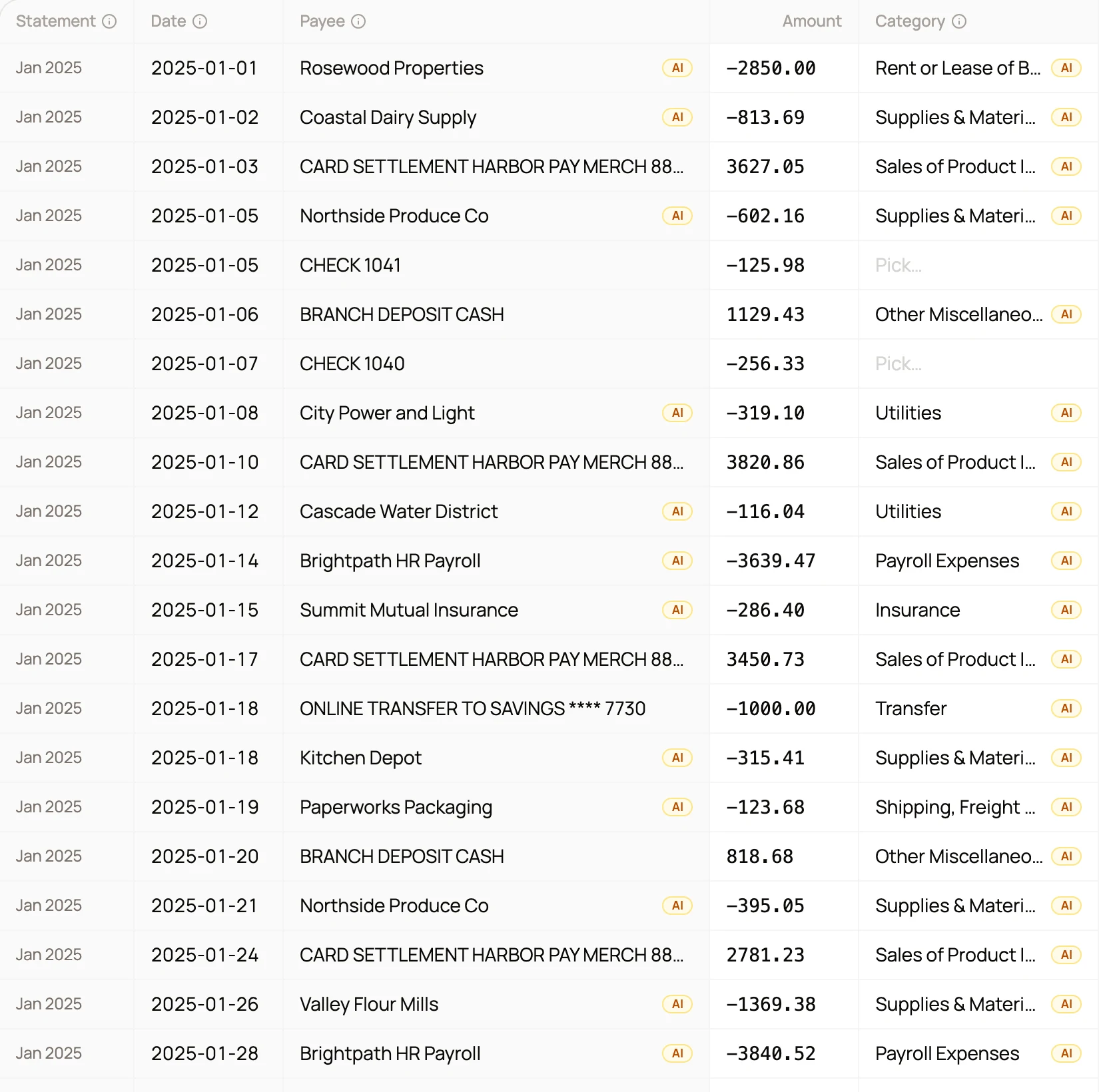
Put every statement for a client or an account into a project. CapyParse lines them up month by month and checks that each closing balance carries into the next month.
Missing months flagged. A gap in the year or a month uploaded twice shows up before you export.
Rules for each client. Categories and payee rules stay with the project, so new statements are sorted the same way.
One file for the year. Export every statement together as one CSV, Excel or QBO file.
How It Works
Three steps from PDF to clean, importable data
Upload your statements
Drop in one PDF or a whole year. Digital PDFs, scans and phone photos all work.
Every row is checked
Dates, descriptions and amounts are read from every page and checked against the statement's own balances.
Review and export
Fix anything flagged, then export CSV, Excel, QBO or OFX for QuickBooks, Xero, Sage, Wave or a spreadsheet.
Checked before you export
Review every transaction before you export
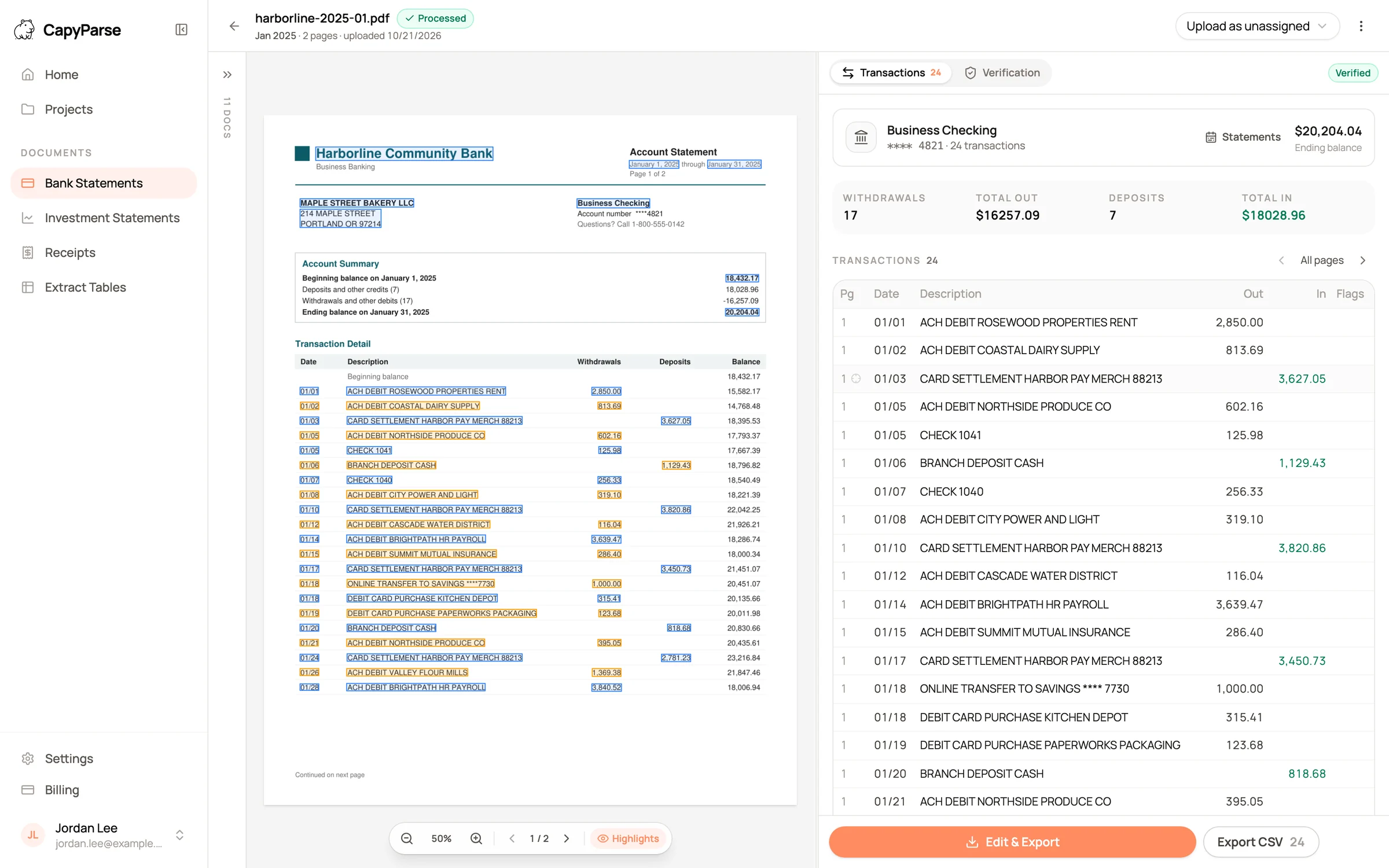
Nothing goes into your books unchecked. Every transaction is either proven by the statement's own balances or flagged for you to review, side by side with the original page.
Proven or flagged
Every row is proven by the statement's balances or marked Needs review, so you only check what needs a second look.
Balances reconciled
Opening balance, deposits and withdrawals must add up to the closing balance. Running balances and printed totals are checked too.
Per-account summaries
Consolidated statements are split into clean tables, one per account.
50,000+
Pages converted
1,000+
Banks & credit unions
5
Export formats
Used by accountants and bookkeepers. Seconds per statement, not hours.
Works with your bank
Dedicated converters and export-limit guides for the biggest banks and card issuers in the US and Canada. Banks in the UK and South Africa work too, and so do statements in French.
Not seeing yours? Any statement layout works
Capabilities
Built for the statements other tools reject
Blurry scans, French statements, five accounts on one PDF. The messy documents are the whole point.
Scanned bank statement OCR
Paper statements, faxes, phone photos: CapyParse reads the documents other converters reject, then checks every row against the statement's own balances and flags anything it cannot prove.
1,000+ banks worldwide
Chase, Bank of America, credit unions, and banks in Canada, the UK and South Africa. English or French, with no templates to set up.
Export to CSV, Excel, QBO & OFX
Files formatted for QuickBooks, Xero, Sage, Wave and your spreadsheet on the first try.
Clean up with AI
Categorize transactions, normalize payees, fix dates, and flip signs in the export editor before you download.
Several accounts, cards & investments
A PDF with several accounts is split, so each account gets its own table and its own export. Credit card and investment statements work too.
Private & secure
Encrypted in transit and at rest. Each document belongs to your team, and we never sell your data. How we handle your data
Why switch
Hours of retyping, or seconds of review
The same statement, two ways to handle it.
Manual entry
- Hours per statement
- Typos and transposed digits
- No import-ready file
- One month at a time
With CapyParse
- Seconds per statement
- Review every transaction before export
- CSV, Excel, QBO, OFX & QFX exports
- A whole year in one export
Plays nicely with your accounting stack
Every export is formatted for a first-try import. Pick a logo for the step-by-step guide.
Using Sage or Wave? See the Sage guide or the Wave guide.
Pricing
Cents per page, not hours of retyping
Try 10 pages free, no card needed.
Free
Try it on your own statements
- 10 free pages
- Additional pages available for purchase
- CSV & Excel exports
- Basic support
Starter
For individuals and busy months
- 150 pages/month
- All export formats
- QuickBooks integration
- 3 workspace members
Annual billing available with 2 months free. Compare all plans
FAQ
Frequently asked questions
Everything about converting bank statements with CapyParse.
Upload your bank statement PDF to CapyParse and the AI extracts every transaction automatically. Review the data, then export to CSV, Excel, QBO, OFX, or QFX. No manual data entry or templates required.
Yes. You can convert up to 6 pages a day right on the homepage with no signup, and a free account adds 10 more pages with Excel and QBO export. Paid plans are available when you need higher volume.
Yes. Create a project for a client or an account and add every statement. CapyParse puts them in one grid, flags a missing or duplicate month, keeps your categories and payee rules for that client, and exports everything as one CSV, Excel, or QBO file.
CapyParse works with 1,000+ banks worldwide, including Chase, Bank of America, Wells Fargo, Citi, and Capital One, plus banks in Canada, the UK, and South Africa. It reads English and French statements, credit card statements, and investment statements. Export to CSV, Excel (XLSX), QBO, OFX, and QFX for import into QuickBooks, Xero, Sage, Wave, and Google Sheets.
Yes. CapyParse includes built-in OCR that reads scanned and photographed statements, not just digital PDFs. For best results, scan at 300 DPI or higher.
Export your statement as a QBO (Web Connect) file and upload it in QuickBooks under Banking, or import the CSV directly. CapyParse formats dates, amounts, and descriptions so QuickBooks accepts the file on the first try.
Yes. Consolidated statements that combine several accounts are split automatically, so each account gets its own clean transaction table and its own export.
All uploads are encrypted in transit via HTTPS, and stored files are encrypted at rest. Each document belongs to your team, other customers cannot open it, and we never sell your data. You can remove any document from your dashboard at any time.
Explore our converters
Free, focused tools for every format. Most run right in your browser.