
Convert Any PDF to CSV or Excel, AI Reads Scanned PDFs
Upload your PDF bank statement, invoice, or financial document. CapyParse's AI extracts every table and transaction, then lets you export clean data in any format.
10 free pages - no credit card required
How It Works
Upload your PDF and get clean, structured CSV data.
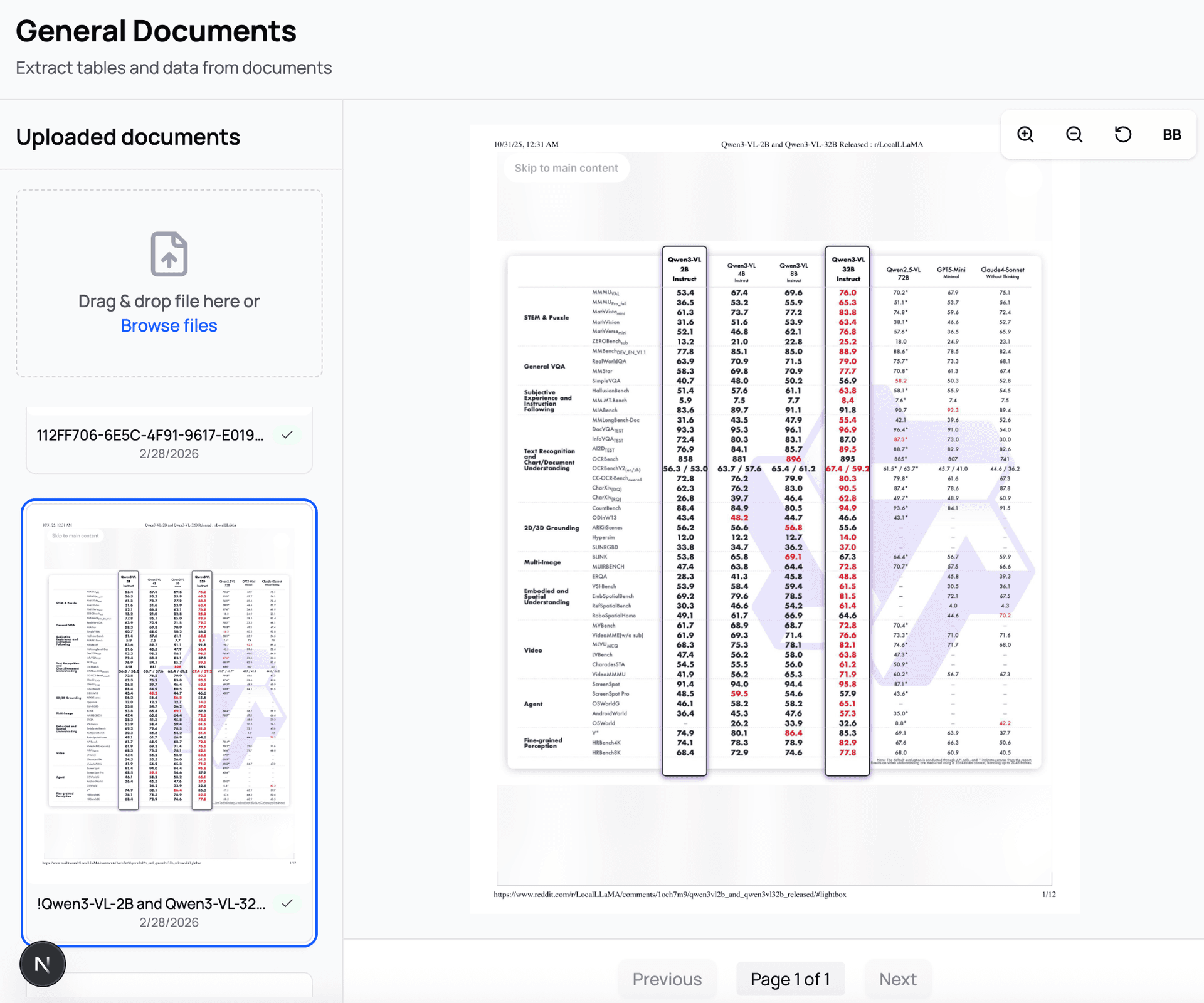
Upload Your PDF
Drag and drop any PDF, JPG, or PNG file. CapyParse handles native PDFs, scanned documents, and even photos of documents with built-in OCR.
- + PDF, JPG, and PNG supported
- + Built-in OCR for scanned documents
- + Upload multiple files at once
Review Extracted Data
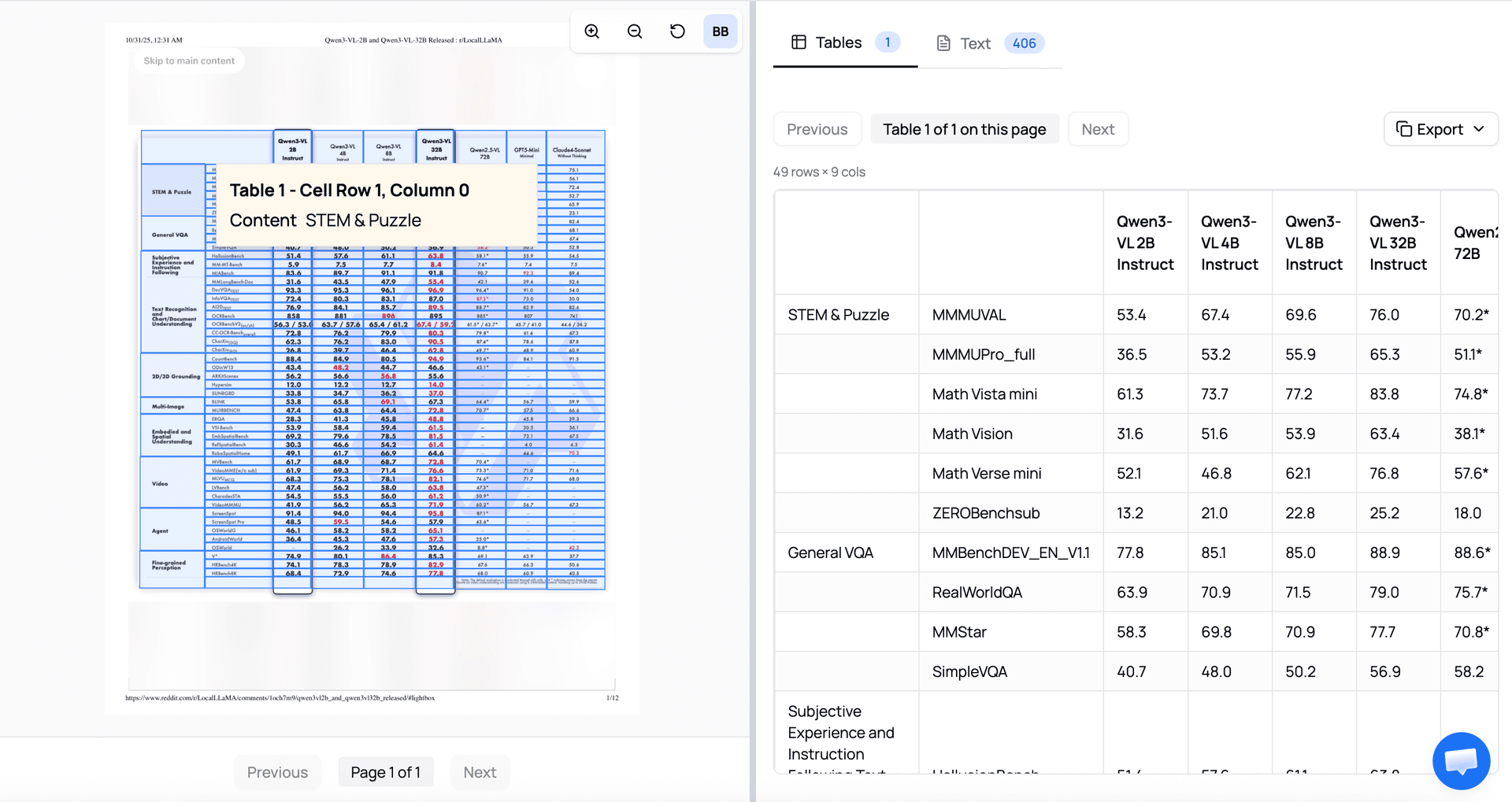
The AI identifies every table and transaction in your PDF. Review the extracted data in an interactive table with search, sort, and summary calculations.
- + 99%+ accuracy on digital PDFs
- + Automatic income/expense totals
- + Side-by-side PDF view to verify
No credit card required. Results in seconds.
How to Convert PDF to CSV
Upload PDF
Drag and drop or click to upload your PDF bank statement. Supports native PDFs and scanned documents up to 10MB.
AI Processes Data
Our AI reads the PDF, applies OCR if needed, and extracts every transaction with dates, descriptions, and amounts.
Download CSV
Review the extracted data and download as CSV, Excel, or QuickBooks format. Ready for import into any spreadsheet or accounting tool.
Supported Formats
CapyParse converts PDF bank statements from any financial institution. The AI adapts to any layout - no templates required.
Input Formats
- + Native (digital) PDF bank statements
- + Scanned bank statement PDFs (OCR)
- + Photographed documents
- + Credit card statement PDFs
- + Investment account statements
Output Formats
- + CSV (comma-separated values)
- + Excel (.xlsx)
- + QuickBooks-compatible format
- + JSON (structured data)
- + Interactive spreadsheet view
99%+
Accuracy on digital PDFs
10 Pages
Free - no credit card required
Encrypted
HTTPS + auto-delete after processing
Frequently Asked Questions
How do I convert a PDF to CSV for free?
Sign up for CapyParse and upload your PDF. The AI extracts table data into CSV format automatically. The first 10 pages are free with no credit card required.
Can this converter handle scanned documents?
Yes. CapyParse includes built-in OCR that reads text from scanned PDFs and photographed documents. It works with scanned bank statements, faxed documents, and phone photos. Learn more about scanned statement conversion.
What types of PDFs can be converted?
CapyParse specializes in bank statement PDFs but works with any PDF containing tabular data. This includes bank statements, credit card statements, investment account statements, invoices, and financial reports.
Can I convert PDF to Excel instead of CSV?
Yes. CapyParse supports CSV, Excel (.xlsx), and QuickBooks-compatible output formats. You can also export to JSON for programmatic use.
How accurate is the conversion?
CapyParse achieves 99%+ accuracy on native (digital) PDF bank statements. Scanned documents typically range from 95-99% accuracy depending on scan quality.
Is my data secure?
Yes. All uploads are encrypted via HTTPS.
Related Tools & Guides
Bank Statement Converter
Full-featured converter with analytics
QBO to CSV Converter
Convert QuickBooks QBO files to CSV
Converter Comparison
10 tools tested and compared
Chase Statement Guide
Step-by-step Chase conversion
FreshBooks Import Guide
Import CSV into FreshBooks
Wave Import Guide
Import CSV into Wave Accounting